Make a cross stitch pattern from a photo
Choose a photo in the tool below, set the width in stitches and the number of colors, and Moonleaf makes the pattern in your browser. You get a symbol chart with bold lines every 10, a color key with stitch counts and skeins, and a printable PDF. Size it with one sum, stitches ÷ fabric count = inches. An 80-stitch-wide pattern is 5.7 inches across on 14-count Aida.
Make a cross stitch chart from a photo
Runs in your browser. Nothing is uploaded. No sign-up.
No photo handy?
80 stitches wide · choose a photo to see the height
More options
Pinch or scroll to zoom, drag to move. Tap a color in the key to highlight it.
Moonleaf Pro is coming soon · $4.99 per chart or $14.99 lifetime
- The printable PDF: cover, color key with amounts, chart pages with a page map
- Written row-by-row instructions for C2C and row crafts
- Charts up to 400 stitches wide and 70 colors
Everything above is free while we launch. Leave your email and we'll write once, when Pro is ready.
How does a photo become a cross stitch pattern?
A cross stitch chart is a grid where each square is one full cross on the fabric. To make one from a photo, Moonleaf does five things, all on your device:
- Crops and shrinks the photo to the grid. Each square of the chart takes the average color of the pixels it covers, so an 80-stitch-wide chart of a 960-pixel-wide photo averages a 12 × 12 block of pixels per stitch.
- Finds the photo’s main colors. It groups similar colors with k-means in CIE Lab, a color space where equal distances look like equal differences to the eye. Plain RGB would treat a dark green and a dark blue as near neighbors.
- Names each color with the nearest floss shade. It compares colors with CIEDE2000, the color-difference formula used in the textile and print trades. If two photo colors land on the same shade, they merge, so you may get fewer colors than you asked for.
- Cleans up confetti. A single stitch with no neighbor of the same color is slow to stitch and hardly shows. With “Remove confetti” on (the default), it takes the color most of its neighbors have.
- Counts every color and works out the fabric and skeins.
Dithering, which scatters stitches of two colors to fake a third, is off by default. It makes photos look smoother on screen but fills the chart with confetti.
A worked example: a cat at 80 stitches wide
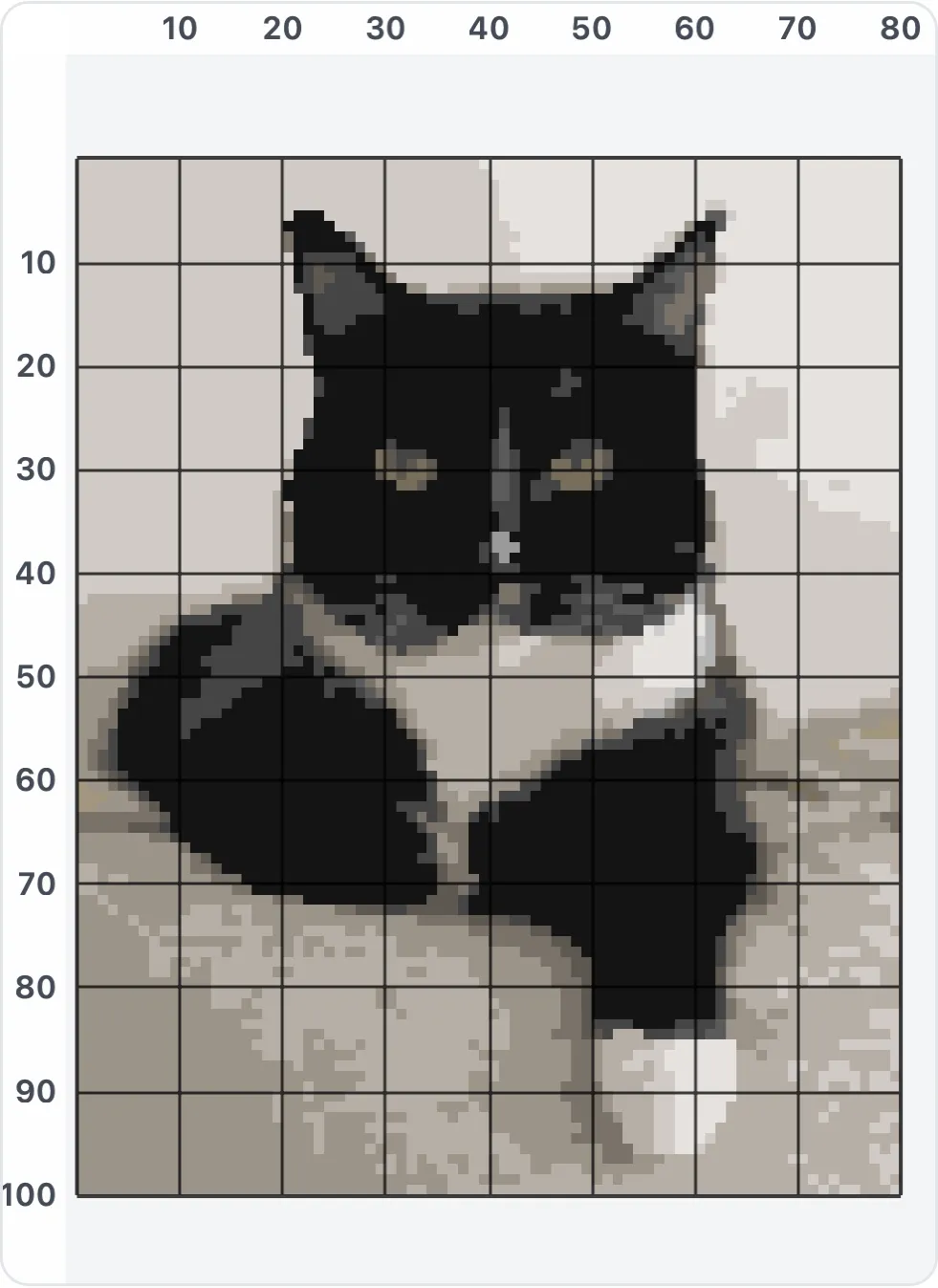
We ran the tool on a public-domain photo of a tuxedo cat (960 × 1,204 pixels, by Ryan Schwark, CC0) with the defaults: 80 stitches wide, up to 20 colors, 14-count Aida, 2 strands.
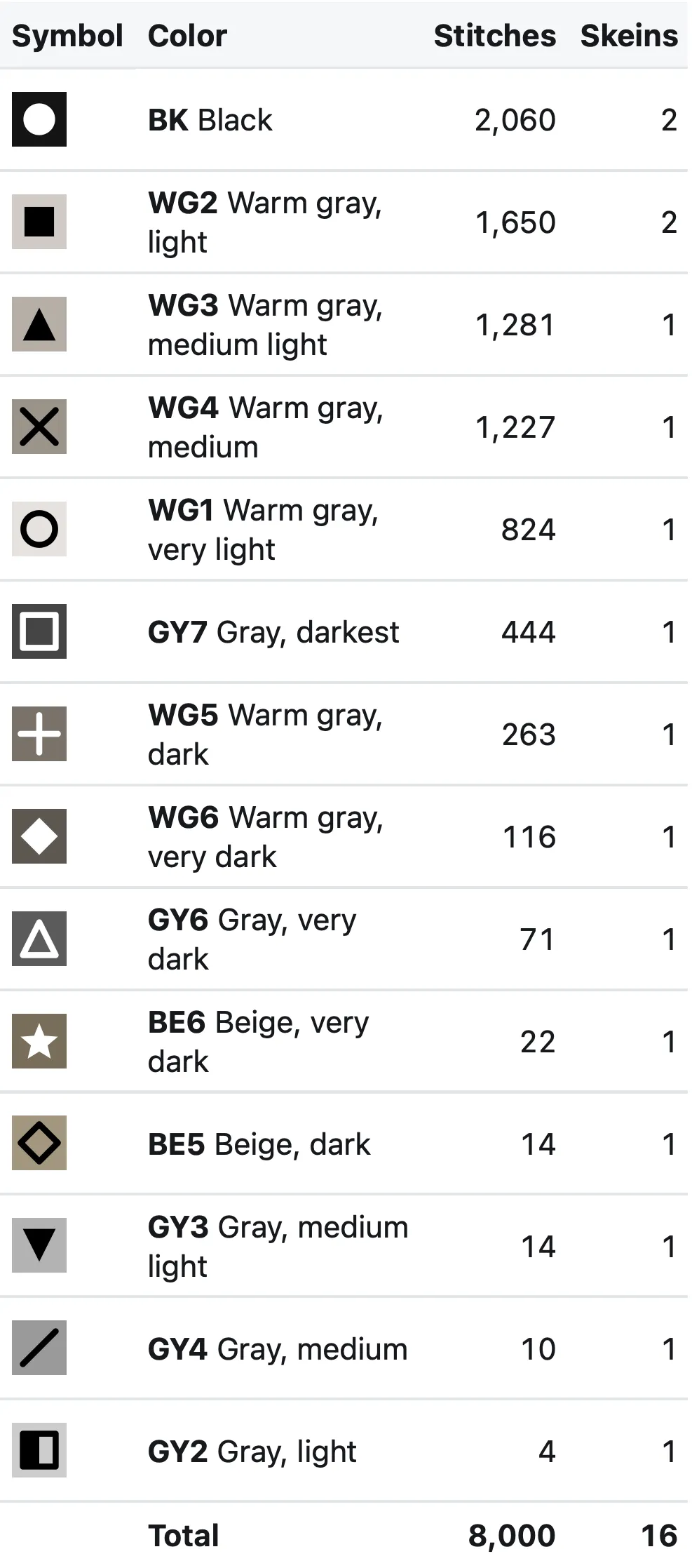
- Chart: 80 × 100 stitches, 8,000 full crosses, 14 colors. The other 6 of the 20 landed on a shade already used, or lost their last stitches in the confetti cleanup.
- Finished size: 5.7 × 7.1 inches (14.5 × 18.1 cm). Fabric to cut: 11.7 × 13.1 inches, with 3 inches on every side.
- Floss: 16 skeins, every color rounded up to whole skeins, with a 15% safety margin. Black is the biggest color, at 2,045 stitches.
- Speed: the chart took 29 to 64 milliseconds and the 6-page PDF 0.16 to 0.28 seconds over three runs, in Playwright’s WebKit 27.2 (Safari’s engine) at an iPhone 15 screen size on an Apple M4 Mac. A 12-megapixel photo (4,032 × 3,024 pixels, the iPhone camera’s usual size) opened and charted in 0.25 to 0.39 seconds.
How many stitches wide should my pattern be?
Work backwards from the size you want. The count of a fabric is the number of stitches in an inch (DMC’s definition), so:
stitches = inches × count, and inches = stitches ÷ count.
| Stitches wide | 11-count | 14-count | 16-count | 18-count |
|---|---|---|---|---|
| 60 | 5.5 in | 4.3 in | 3.8 in | 3.3 in |
| 80 | 7.3 in | 5.7 in | 5.0 in | 4.4 in |
| 100 | 9.1 in | 7.1 in | 6.3 in | 5.6 in |
| 150 | 13.6 in | 10.7 in | 9.4 in | 8.3 in |
| 200 | 18.2 in | 14.3 in | 12.5 in | 11.1 in |
Detail costs stitches. At 40 stitches wide a face is a few blocks; at 80 the cat’s eyes, nose and white chest all read clearly; at 150 you get fur texture but four times the stitching. If you know the frame size instead, switch “Size by” to Finished size in the tool. Type the inches and the crop box locks to that shape. For the fabric itself, the Aida fabric size calculator does the sum for every count.
How many colors should I choose?
Start with 15 to 20 colors for a photo and 4 to 10 for a logo, a silhouette or text. Pixel art is different: Moonleaf spots it and charts one pixel per stitch (pixel art to cross stitch). Then look at the preview and raise or lower the number. Watch two things:
- The color key. Colors with only a handful of stitches (the cat chart’s smallest had 2) are often noise. Lowering the color count merges them.
- Skeins. Each color is at least one skein, so 30 colors means at least 30 skeins even for a small piece.
Tap a color in the key to highlight it on the chart. It’s the quickest way to see where a shade is used and whether you need it.
Should the background be stitched?
Not always. Under More options, the background can be charted like the rest, left unstitched so the Aida shows through, or turned into one plain color. Moonleaf finds the background as the area joined to the photo’s edge whose color is close to the most common edge color, so a white chest on a cat in front of a white wall stays stitched. Leaving it unstitched also cuts the stitch count and the floss you need. Transparent PNGs are left unstitched automatically.
How do I read the chart?
- Each square is one full cross stitch in the color its symbol stands for in the key. Switch the view to Symbols to see the black-and-white version that prints without ink-heavy fills.
- Bold lines every 10 stitches help you count. The numbers along the edges count them.
- Start in the middle. DMC’s guide to reading a chart says to “follow the four arrows… where they all intersect”. The PDF marks the center with small triangles on all four edges. Starting there centers the design on your fabric.
- Zoom on the phone: pinch or scroll to zoom and drag to move. Tap a color in the key to highlight just those stitches.
New to charts? How to read a cross stitch chart walks through the symbols, the key, backstitch lines and charts split over pages.
How much fabric and floss do I need?
Fabric: the design size plus a margin on every side. DMC advises “a clear border of at least 8cm/3inches all the way around your design” if you’ll mount or frame it, and Moonleaf uses 3 inches. For the cat, 5.7 × 7.1 inches of stitching needs 11.7 × 13.1 inches of fabric.
Floss: a DMC six-strand skein is 8 m (8.7 yards). We use a published estimate, the Mismatch formula: on 14-count with 2 strands, one skein covers about 1,785 full cross stitches. Lord Libidan measured 1,650 to 1,850 stitches a skein, depending on how carefully the thread was used. Moonleaf adds a 15% safety margin and rounds each color up to whole skeins. The full method, with a table for other counts and strands, is in how many skeins of floss do I need.
Why doesn’t it give DMC numbers?
Because we couldn’t find a DMC color list we’re allowed to copy. DMC doesn’t publish one, and its site terms forbid reproducing its color cards. The lists on code-sharing sites trace back to unlicensed web tables. So charts use Moonleaf’s own 209 named floss shades (for example “Warm gray, medium light”), each with a swatch to match at the store. Under “Colors from” you can also keep the photo’s own colors as hex codes, or paste your own thread list (number, name, hex color). It stays on your device, and the key then shows your numbers. DMC is a trademark of DMC; Moonleaf is not affiliated with or endorsed by DMC.
What’s in the PDF?
- A cover with a color preview, the finished size, the fabric to cut and the total skeins.
- The color key: symbol, color swatch, number, name, stitches and skeins per color.
- Chart pages of up to 50 × 70 stitches. Each page repeats the last 3 columns and rows of the page before, shaded, so you never lose your place at a page edge. A page map shows how the pages fit together.
The PDF also carries the chart itself, so you can open it in the pattern keeper for iPhone and iPad and mark stitches as you go. Making a needlepoint canvas instead? The needlepoint pattern maker uses canvas mesh sizes and wool amounts.
Questions people ask
Can I make a cross stitch pattern from a photo for free?
Yes. Moonleaf is free while we launch, with no sign-up and no watermark. You get the chart, the color key with skein counts and the printable PDF. The photo is processed in your browser and never uploaded.
What size should a cross stitch pattern from a photo be?
Pick the width from the size you want to frame. Multiply inches by the fabric count. A 6-inch-wide piece on 14-count Aida is 84 stitches wide; the same 84 stitches are 4.7 inches on 18-count. Pets and faces need roughly 80 stitches or more across to keep their features.
How many colors should a cross stitch pattern from a photo have?
Most photo patterns look right with 15 to 30 colors. A simple graphic needs 4 to 10. More colors mean more skeins and more single stitches of a color, so start low and raise the number until the preview looks right.
What fabric count is best for a photo pattern?
DMC recommends 14-count Aida for beginners, and it's the count Moonleaf starts with. Higher counts (16, 18) make the same chart smaller and finer. Evenweave or linen stitched over two threads works like half its count, so 28-count over two equals 14-count.
Does the pattern use DMC thread numbers?
Not yet. We found no DMC color list we're allowed to reuse, so the chart names its colors from Moonleaf's 209 floss shades (or the photo's own colors as hex codes), and you can load your own thread list. Moonleaf is not affiliated with DMC.
Is my photo uploaded?
No. The photo is read, cropped and charted by code running on your phone or computer. You can check it in your browser's network panel. Nothing carries the photo anywhere.
Related
- Aida fabric calculatorWork out how big your cross stitch will be and how much Aida, evenweave or linen to cut, for any stitch count, fabric count and framing margin.
- How many skeins of flossOne 8 m skein covers about 1,785 cross stitches on 14-count with 2 strands. Work out skeins per color for any count and strands, with a margin.
- Needlepoint from a pictureTurn a picture into a needlepoint chart for 10 to 18 mesh canvas, with a color key, canvas size, wool yardage per color and a printable PDF.
- Pattern keeper for iPhone and iPadPattern Keeper is Android-only. The iPhone and iPad apps that open cross stitch PDFs, compared, plus Moonleaf's free in-browser pattern keeper.
- All Moonleaf toolsTurn a photo into a cross stitch, crochet or knitting chart