Pattern Keeper alternative for iPhone and iPad
Pattern Keeper runs only on Android. Its own site says "iOS version in early development!" (checked November 21, 2026). On iPhone and iPad, apps such as Markup R-XP, StitchGrid and Purl open designers' PDF charts and let you mark stitches. Moonleaf's free pattern keeper, below, runs in Safari with no install and saves your progress on the device. It opens charts made with Moonleaf, not designers' PDFs.
What is Pattern Keeper, and is it coming to iPhone?
Pattern Keeper is an Android app by Datadromeda AB for working through cross stitch PDFs on a phone or tablet. Its Google Play listing describes it as a way to “view and annotate PDF cross stitch charts”. It shows the chart as one continuous pattern across page breaks, lets you highlight a symbol and swipe to mark stitches, and counts what’s left for each thread. Pricing, from the listing: a month-long free trial, then “a one time charge of around 9 USD”. The site offers a $9.00 lifetime deal.
On iPhone and iPad it isn’t available yet. On November 21, 2026 the homepage banner read “iOS version in early development!”, and the FAQ answered “Is Pattern Keeper available on iOS?” with “No not yet. We are working on it!” The app also says it is “still in beta” and that backstitches and fractional stitches aren’t supported.
Which iPhone and iPad apps can I use instead?
These all run on both iPhone and iPad. We checked each App Store listing (US store) on November 21, 2026; prices and features change, so check before you buy.
| App (developer) | Price as listed | Opens | Ratings | Last update |
|---|---|---|---|---|
| Markup R-XP (Kewin Lawson Smith) | Free; Full $9.99 or $19.99/year | PDF patterns, photos of paper charts | 4.7 (3.1K) | Nov 9, 2026 |
| StitchGrid (Karolis Valatka) | $14.99 | PDF patterns (not photos of paper charts) | not shown | Oct 27, 2026 |
| Purl (Kadir Karakas) | Free; Lifetime $9.99 | PDF, paper scans | reset | Nov 6, 2026 |
| MyCozyApp (MyCozyApp OU) | Free; in-app $0.99 and $9.99 | Digital PDF, OXS, CSTX, XSD | 5.0 (2) | Nov 17, 2026 |
| Cross Stitch Saga (Irina Kopylova) | $15.00 | XSD, XSP, PAT, OXS, DIZE, CSS, SAGA (not PDF) | 4.3 (60) | Oct 23, 2026 |
| StitchHub (Diana Białogrzywa) | Free; $3.99/month to $89.99/year | HUB, OXS, XSD, PAT, PDF | 4.0 (3) | Nov 21, 2026 |
| Evenweave (Girishkumar Shrimali) | Free; Unlimited $12.99 | PDF, photos | 1.0 (2) | Aug 28, 2026 |
Two notes. “Cross Stitch: Magic Embroidery” uses “Pattern Keeper” in its subtitle but isn’t the Pattern Keeper app. And if you only want to cross off stitches on a PDF with a pencil, Lord Libidan’s review of markup apps covers general apps such as Goodnotes and Apple Books.
How does Moonleaf’s pattern keeper work?
Moonleaf makes charts from photos (see the cross stitch pattern maker), and its pattern keeper lets you stitch them on a phone or tablet. It runs in Safari, with nothing to install and no account. Open a chart one of three ways:
- Right after making it: tap Track my progress under the chart.
- From the PDF: every Moonleaf PDF carries its chart inside, so “Open a chart file or PDF” below reads it straight from the PDF. AirDrop the PDF from your computer to your iPad, save it to Files, and open it here.
- From a chart file (.json) saved with “Save chart file”.
Pattern keeper: mark your stitches
Open a chart made with Moonleaf. Your progress is saved on this device after every tap.
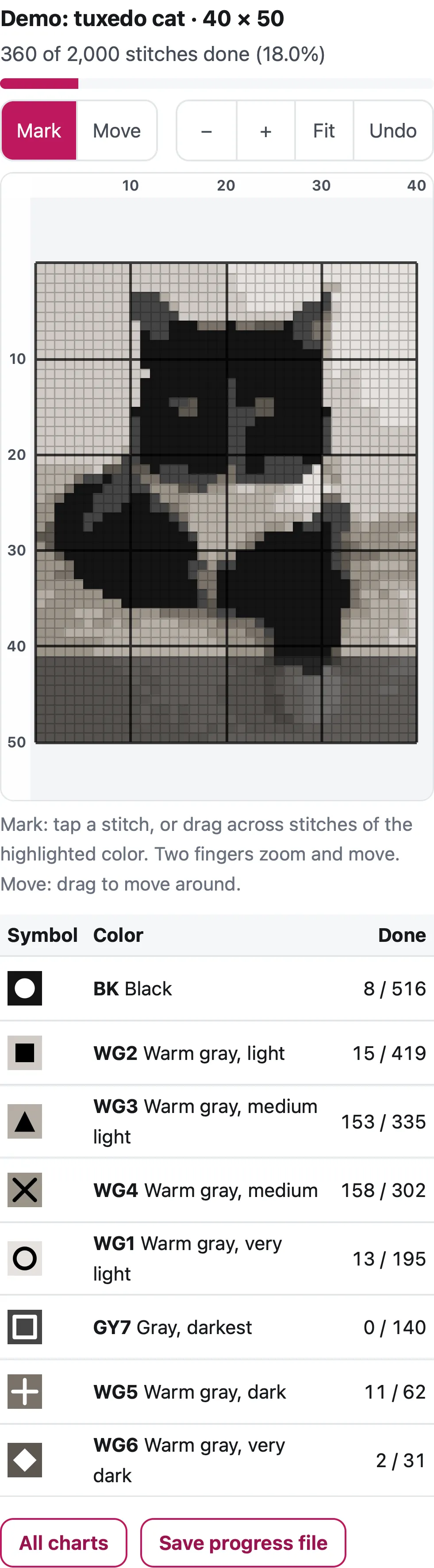
Mark: tap a stitch, or drag across stitches of the highlighted color. Two fingers zoom and move. Move: drag to move around.
Runs in your browser. Nothing is uploaded. No sign-up.
Then:
- Mark: tap a stitch to mark it done (tap again to undo it), or drag across a row. Two fingers pinch to zoom and drag to move. Switch to Move if you want one finger to scroll.
- Highlight a color: tap it in the list. Everything else fades, marking only affects that color, and the view jumps to its first stitch still to do. This is the Pattern Keeper way of working: one color at a time, without counting.
- Progress: the bar shows stitches done out of the total, and each color shows its own “done / total”.
- Undo reverses the last tap or drag.
We tested it in Safari’s engine (Playwright WebKit 27.2) at an iPhone 15 screen size. We marked 9 rows of a 40 × 50 demo chart (360 of 2,000 stitches) and reloaded the page. The chart reopened at 360 done, 18.0%.
Where is my progress saved, and can I lose it?
Your marks are saved on the device, in the browser’s own storage, after every change. Nothing is sent to us. Once the page has loaded, marking keeps working and saving even without a connection; only opening the page needs one. Three things to know:
- Safari’s 7-day rule. WebKit deletes a website’s stored data “after seven days of Safari use without user interaction on the site” (WebKit, March 2020). Web apps added to the Home Screen “have their own counter of days of use”, so add Moonleaf to your Home Screen. In Safari, tap the Share button, then Add to Home Screen.
- Private browsing may not keep data after you close the tab.
- Moving devices: progress stays on the device it was made on. Tap Save progress file and open that file on the other device to carry on.
What can’t it do yet?
Being straight about the gaps:
- Designers’ PDF patterns don’t open. That’s Pattern Keeper’s main job on Android and what the iOS apps above do. Moonleaf’s keeper opens charts made with Moonleaf.
- Full stitches only. No backstitch, fractional stitches or French knots, which Moonleaf’s charts don’t include.
- No sync between devices. Use the progress file.
If you mostly stitch designers’ patterns, one of the apps in the table is the better fit today. If you chart your own photos (pets, family, places), Moonleaf does the chart, the skein counts, the fabric size and the tracking in one place, free, on the iPhone or iPad you already have.
Questions people ask
Is Pattern Keeper available on iPhone or iPad?
Not yet. On November 21, 2026 its homepage said "iOS version in early development!", and its FAQ answered "Is Pattern Keeper available on iOS?" with "No not yet. We are working on it!" It's on Google Play for Android.
What is the best Pattern Keeper alternative for iPad?
For designers' PDF patterns, look at apps that import PDFs and let you mark stitches, such as Markup R-XP (the most-rated, 4.7 from 3.1K ratings on the US App Store), StitchGrid or Purl. For charts in pattern-software formats (XSD, OXS, PAT), Cross Stitch Saga. For charts you make yourself from a photo, Moonleaf's keeper is free in Safari.
Is there a free Pattern Keeper alternative for iPhone?
Several apps are free to download with paid upgrades (Markup R-XP, Purl, MyCozyApp, Evenweave). Moonleaf's pattern keeper is free with no account and nothing to install, but only for charts made with Moonleaf.
Can I open my PDF patterns in Moonleaf's pattern keeper?
Only PDFs made by Moonleaf, which carry the chart inside them. A designer's PDF is a picture of a chart, and reading it reliably is what Pattern Keeper and the apps above specialize in; we don't support it yet.
Will my progress be saved?
Yes, on that device, after every tap. Safari can delete a website's saved data after 7 days of using Safari without visiting the site, so add the page to your Home Screen (web apps there keep their data), or save a progress file now and then.
How much does Pattern Keeper cost?
Its Google Play listing says there's a month-long free trial and then "a one time charge of around 9 USD", and its site offers a $9.00 lifetime deal (checked November 21, 2026).
Related
- Cross stitch from a photoTurn any photo into a cross stitch pattern with symbols, a color key, skein counts and a printable PDF. Runs in your browser; nothing is uploaded.
- How many skeins of flossOne 8 m skein covers about 1,785 cross stitches on 14-count with 2 strands. Work out skeins per color for any count and strands, with a margin.
- Aida fabric calculatorWork out how big your cross stitch will be and how much Aida, evenweave or linen to cut, for any stitch count, fabric count and framing margin.
- All guidesEvery Moonleaf guide, by task.