Make a C2C crochet pattern from a picture
Choose a picture in the tool below, set the width in tiles and the number of colors, and Moonleaf makes the C2C graph and the written row-by-row color counts. Each square is one tile (chain 3 and 3 double crochet). Row 1 is a single tile in the bottom-right corner, and the rows alternate ↗ and ↙ along the diagonals. With worsted yarn on a 5 mm hook a tile is about 0.8 inch, so a 50-tile-wide graph makes a blanket about 40 inches wide.
Make a C2C crochet chart from a photo
Runs in your browser. Nothing is uploaded. No sign-up.
No photo handy?
50 tiles wide · choose a photo to see the height
More options
Pinch or scroll to zoom, drag to move. Tap a color in the key to highlight it.
Moonleaf Pro is coming soon · $4.99 per chart or $14.99 lifetime
- The printable PDF: cover, color key with amounts, chart pages with a page map
- Written row-by-row instructions for C2C and row crafts
- Charts up to 400 stitches wide and 70 colors
Everything above is free while we launch. Leave your email and we'll write once, when Pro is ready.
What is a C2C graph?
C2C (corner to corner) crochet builds a blanket out of small square tiles, worked in diagonal rows. In a C2C graph each square is one tile. Lion Brand describes it as “Each square in the graph = chain 3 + 3 DC”. You start a row with a chain of 6 and 3 double crochets. Each next tile is a slip stitch into the chain-3 space of the tile beside it, a chain 3, and 3 double crochets in that space (Sarah Maker’s C2C tutorial).
Because every tile has one color, a picture turns into a C2C graph the same way it turns into a cross stitch chart. Moonleaf averages the picture into one color per tile, finds the main colors in a perceptual color space (CIE Lab), and matches each to the nearest of 68 named yarn colors. It also writes out the diagonal rows, since most crocheters work C2C from written counts rather than counting squares.
How do I read the written C2C rows?
Row 1 is a single tile in a bottom corner, usually the bottom right. Each row after that is one diagonal of the graph, and you turn at the end of every row. Lion Brand’s C2C guide puts it this way: “row 2… read diagonally from left to right and row 3 from right to left”. So from a bottom-right start:
- Even rows run ↗: up the graph, left to right.
- Odd rows run ↙: down the graph, right to left.
The colors in each line are listed in the order you work them, so “Row 6 ↗: 1 B, 1 D, 3 B, 1 D [6]” means one tile of B, one of D, three of B and one of D, six tiles in all. The key letters (A, B, C…) are in the color key under the chart.
Each row also says how its ends behave. You increase at an end until it reaches an edge of the blanket, then decrease there. A rectangle increases at both ends until the first corner, then increases at one end and decreases at the other, then decreases at both ends (Sarah Maker). Moonleaf labels every row “inc both ends”, “inc one end, dec the other” or “dec both ends”, so you don’t have to work it out. Left-handed, or prefer the other corner? Set Start corner to “Bottom left (mirror)” under More options.
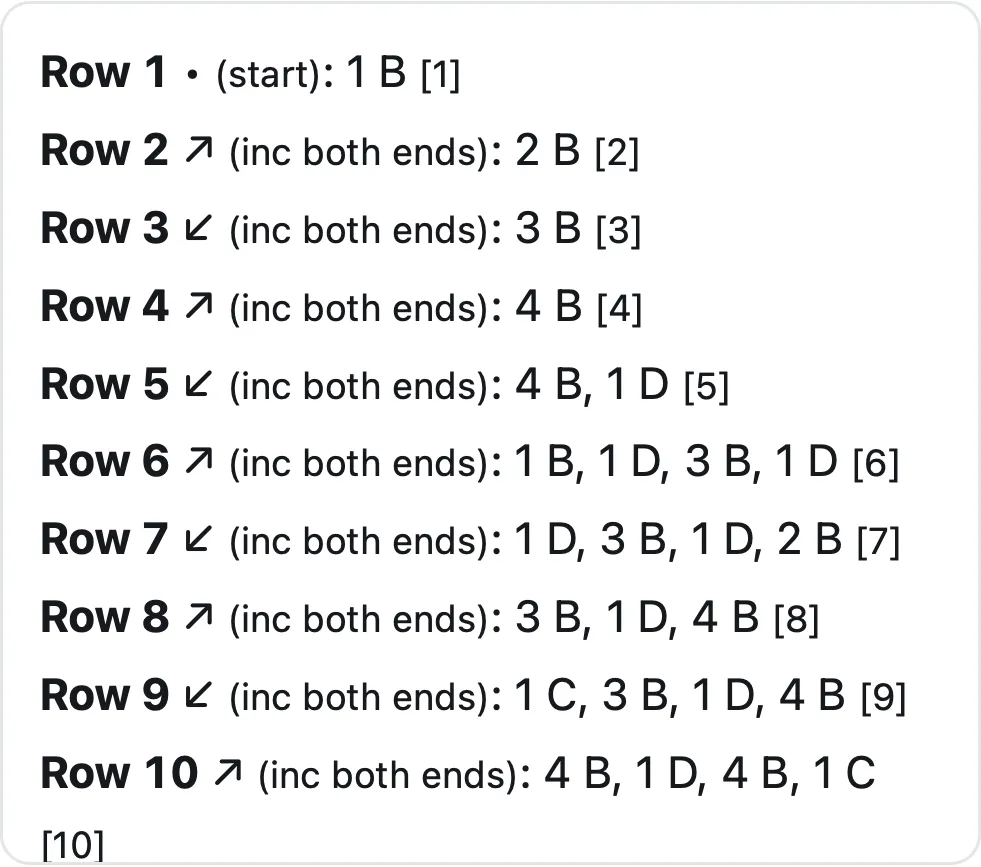
A worked example: a lighthouse blanket
We charted a public-domain photo of Happisburgh Lighthouse (960 × 1,280 pixels, by Alex Chan, CC0) at 50 tiles wide with 6 colors:
- Graph: 50 × 67 tiles, 3,350 tiles, 116 diagonal rows (a C2C rectangle always has width + height − 1 rows).
- Size: 40 × 53.6 inches at 0.8 inch a tile, about a throw.
- Yarn: about 2,697 yards in all with the 15% margin. That’s 10 skeins of 364 yards once each of the 6 colors is rounded up to whole skeins. Royal blue sky is the biggest color, at 1,195 tiles.
- Speed: the graph took 15 to 25 milliseconds and the 6-page PDF (cover, key, graph, three pages of written rows) 0.15 to 0.24 seconds over three runs, in Safari’s engine (Playwright WebKit 27.2) at an iPhone 15 screen size on an Apple M4 Mac.
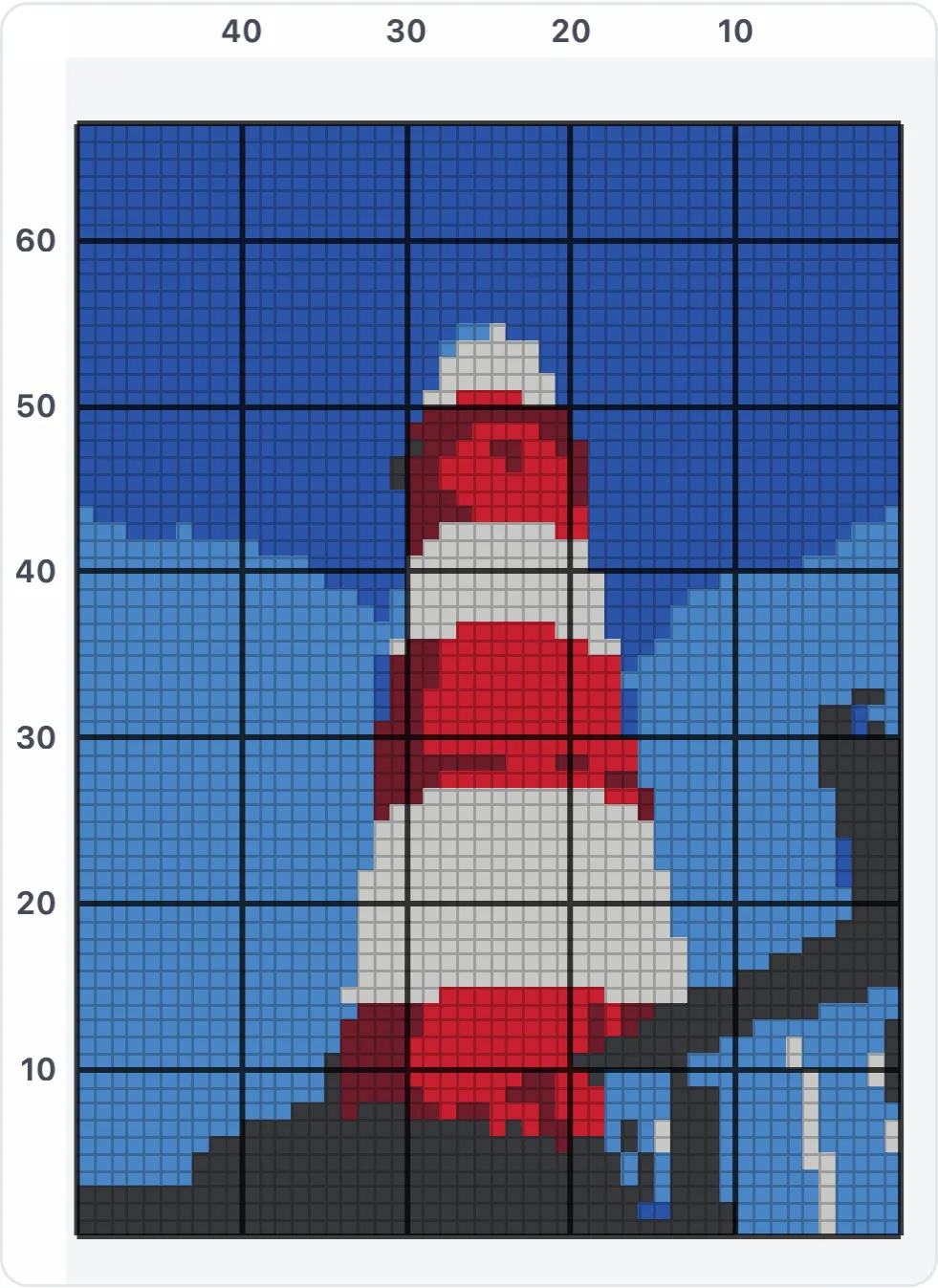
The graph numbers columns from the right and rows from the bottom, matching where you start, and the bold lines every 10 count from that corner too.
How big will my C2C blanket be?
Width in inches = tiles × tile size. Tile size depends on your yarn, hook and tension, and published worsted-weight patterns on a 5 mm hook disagree:
| Source | Gauge | Inches per tile |
|---|---|---|
| Juniper and Oakes | 6 × 6 tiles = 4 in | 0.67 |
| Woodland Skunk C2C blanket | 7 tiles = 5 in | 0.71 |
| The Crochet Crowd (Caron One Pound) | 5 boxes = 4 in | 0.80 |
| The Crochet Couch | 10 rows = 8 in | 0.80 |
| Rolling Stone quilt block | 4 blocks = 3.75–4 in | 0.94–1.0 |
Moonleaf starts at 0.8 inch and lets you type your own: crochet a 10-tile swatch and measure it. Know the blanket size you want? Switch “Size by” to Finished size, type the width and height in inches, and Moonleaf works out the tiles. The C2C graph size calculator turns a blanket size into tiles, rows and yarn for any tile size. The Crochet Crowd’s rule of thumb for a 5 mm hook and worsted: about 30 to 35 blocks for a baby blanket, 42 to 49 for a child’s, and 60 to 70 for a throw.
How much yarn will I need?
We found no yarn company that publishes a per-tile figure, so we worked one out from two published patterns. The Crochet Couch’s heart square uses 60 yards for 121 tiles, about 0.50 yards a tile. The Woodland Skunk blanket uses 3,600 to 3,700 yards for 5,400 tiles, about 0.67 to 0.69. Moonleaf uses 0.7 yards a tile, adds a 15% safety margin, and rounds each color up to whole skeins. A Red Heart Super Saver solid is 364 yards (7 oz), so that’s the default skein size. Change both under More options to match your yarn.
Tiles of one color spread over many small patches use more yarn than the same number in one block, because every change leaves two ends. Buy at least one extra skein of the background color.
How many colors should I use?
Picture blankets usually work best with 3 to 8 colors. Each color change means a new bobbin or a carried strand and more ends to weave in. Turn Remove confetti on (the default) so single stray tiles take their neighbors’ color. Use Background: one plain color under More options to turn a busy photo background into a single color. Graph too blocky? Add tiles before you add colors.
What’s in the C2C PDF?
The PDF has a cover with a color preview, size and total yardage, the color key with tiles and yards per color, the graph split into pages with a page map, and every written row, with direction arrows and increase/decrease notes, to tick off as you go. Prefer single crochet in straight rows? The graphgan pattern maker charts one stitch per square and writes the rows out flat. Tapestry crochet charts carry the colors inside the stitches, and the knitting chart maker does the same for colorwork.
Questions people ask
How do I turn a picture into a C2C crochet pattern?
Choose the picture in the tool on this page, set how many tiles wide the blanket should be and how many colors to use. Moonleaf averages the picture into one color per tile, matches each to a named yarn color, and writes the diagonal rows out for you. It runs in your browser and the picture is never uploaded.
How many squares wide should a C2C blanket be?
The Crochet Crowd's guide (worsted yarn, 5 mm hook) puts a baby blanket at about 30 to 35 blocks wide, a child's at 42 to 49 and a throw at 60 to 70. Multiply by your tile size to get inches. At 0.8 inch a tile, 50 tiles is 40 inches.
How much yarn does a C2C blanket take?
Two published patterns work out at 0.5 and about 0.68 yards of worsted per tile. Moonleaf uses 0.7 yards a tile plus a 15% margin. Our 50 × 67-tile example came to about 2,697 yards, or 10 skeins of 364 yards with every color rounded up.
Where do you start a C2C graph?
Usually at the bottom-right corner, with one tile. Sarah Maker and Lion Brand both start there. The Crochet Crowd notes either bottom corner works. Moonleaf writes the rows from the bottom right by default and can mirror them to start bottom left.
How do I make a rectangle in C2C crochet?
Increase at both ends until you reach the first corner. Then decrease on that side while you keep increasing on the other. Once you reach the second corner, decrease at both ends. The written rows label every row "inc both ends", "inc one end, dec the other" or "dec both ends".
How many colors should a C2C picture blanket use?
Fewer than you'd think. Every color change leaves ends to weave in, so most picture blankets use 3 to 8 colors. Our lighthouse example uses 6. Start low in the tool and add a color only if the preview needs it.
Related
- Graphgan pattern makerTurn a picture into a single crochet graphgan chart with row-by-row color counts, true stitch proportions, yarn yardage and a printable PDF.
- Tapestry crochet chartsTurn a picture into a tapestry crochet chart for rounds or rows, with color counts in working order and yarn amounts that include the carried strands.
- Knitting chart from a pictureTurn a picture into a colorwork knitting chart sized to your gauge, with row-by-row counts, colors-per-row and float checks, yarn amounts and a PDF.
- All Moonleaf toolsTurn a photo into a cross stitch, crochet or knitting chart